> For the complete documentation index, see [llms.txt](https://docs.captioneer.com/llms.txt). Markdown versions of documentation pages are available by appending `.md` to page URLs; this page is available as [Markdown](https://docs.captioneer.com/after-effects/after-effects-plugin/add-captions.md).
# Add Captions
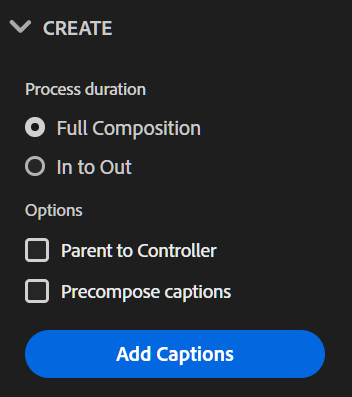
## Process Duration
* **Full Composition** - Process the entire duration of the composition
* **In to Out** - Process the sequence's "In to Out" region
{% tabs %}
{% tab title="Insert" %}
Select a Process Duration, then click **Add Captions**.
New layers are added to the timeline containing your captions text. Use the Text tab to select Text Layers or Precomps.
{% endtab %}
{% tab title="Update" %}
Select a Process Duration, then click **Update Captions**.
Captions text will be 'pushed' into existing Text Layers or Precomps on the timeline.
{% hint style="info" %}
If there are no existing layers at the specified time, those lines are skipped and Captioneer continues processing the rest of the composition.
{% endhint %}
{% endtab %}
{% endtabs %}
### Parent to Controller
Enable this option to link all new layers to a Controller Null.
### Precompose Captions
Enable this option to group all new layers in a new precomp.